How to Calculate Hours Across Midnight for Night Shifts
A shift from 10 PM to 6:30 AM looks like negative time if you subtract it the usual way. Here are two reliable methods for working out hours across midnight, how to take off breaks, how to turn the answer into decimal hours for a timesheet, and a full worked week.
By Om Vaghani, editor at ClockAura (ConnectGo Infoware). Published 31 October 2026.
If you have ever filled in a timesheet for a night shift, you have probably hit this problem. You started at 22:00 and finished at 06:30. Subtract the start from the finish the normal way and you get 06:30 minus 22:00, which is a negative number. You obviously did not work negative hours.
The issue is that the clock resets at midnight. Your shift crossed that reset, so simple subtraction stops working. The fix is easy once you see it, and this guide covers two methods, how to handle breaks, how to convert the result to decimal hours, and a full week of worked examples you can copy.
Use 24-hour time first
Before doing any shift maths, write both times in 24-hour format. It removes the AM/PM confusion completely.
| 12-hour | 24-hour |
|---|---|
| 7:00 PM | 19:00 |
| 10:00 PM | 22:00 |
| 11:50 PM | 23:50 |
| 12:00 AM (midnight) | 00:00 |
| 4:15 AM | 04:15 |
| 6:30 AM | 06:30 |
The rule: for PM times from 1:00 PM onwards, add 12 to the hour. For 12:00 AM to 12:59 AM, the hour becomes 00. If you need a quick check, a military time converter does the switch for you.
Method 1: split the shift at midnight
Break the shift into two pieces: the part before midnight and the part after.
Worked example: 22:00 to 06:30
- Before midnight: from 22:00 to 24:00 is 2 hours.
- After midnight: from 00:00 to 06:30 is 6 hours 30 minutes.
- Add them: 2:00 + 6:30 = 8 hours 30 minutes.
This method is easy to picture, and it is what most people do in their heads. It gets a little fiddly when the start time has minutes, but it still works.
Worked example: 23:50 to 07:05
- Before midnight: 23:50 to 24:00 is 10 minutes.
- After midnight: 00:00 to 07:05 is 7 hours 5 minutes.
- Add them: 0:10 + 7:05 = 7 hours 15 minutes.
Method 2: add 24 hours to the finish time
This is the method to use when you want something mechanical and reliable, for example in a spreadsheet.
If the finish time is earlier than the start time, add 24 hours to the finish time, then subtract.
Worked example: 22:00 to 06:30
- 06:30 is earlier than 22:00, so the shift crossed midnight.
- Add 24 hours: 06:30 becomes 30:30.
- Subtract: 30:30 - 22:00 = 8:30.
Worked example: 19:45 to 04:15
- 04:15 is earlier than 19:45, so add 24: 04:15 becomes 28:15.
- Subtract the hours and minutes. 28:15 - 19:45 needs a borrow, because 15 minutes is less than 45.
- Borrow 1 hour: 28:15 becomes 27:75.
- 27:75 - 19:45 = 8 hours 30 minutes = 8:30.
The borrow step is where most mistakes happen. One hour is 60 minutes, so borrowing an hour adds 60 to the minutes column.
Same worked example in minutes only
If borrowing feels error-prone, convert both times to minutes from midnight:
- Start 19:45 = 19 x 60 + 45 = 1,140 + 45 = 1,185 minutes.
- Finish 04:15 = 4 x 60 + 15 = 255 minutes. Add 24 hours (1,440 minutes): 255 + 1,440 = 1,695 minutes.
- Subtract: 1,695 - 1,185 = 510 minutes.
- 510 / 60 = 8 remainder 30, which is 8 hours 30 minutes.
Worked example: 22:30 to 06:15
This one catches people because both the start and finish have minutes.
- Method 1: 22:30 to 24:00 is 1:30. 00:00 to 06:15 is 6:15. 1:30 + 6:15 = 7 hours 45 minutes.
- Method 2: 06:15 + 24 = 30:15. Borrow: 29:75 - 22:30 = 7:45.
- Minutes: start 1,350, finish 375 + 1,440 = 1,815. 1,815 - 1,350 = 465 minutes = 7 h 45 min, or 7.75 decimal hours.
Taking off breaks
Most timesheets want paid hours, not hours on site. Subtract any unpaid break after you have worked out the full shift length.
Worked example: 19:45 to 04:15 with a 45-minute unpaid break
- Shift length: 8:30 (from above).
- Subtract the break: 8:30 - 0:45. Borrow again: 8:30 becomes 7:90.
- 7:90 - 0:45 = 7:45 paid.
Check it in minutes: 510 - 45 = 465 minutes. 465 / 60 = 7 remainder 45. Same answer.
Converting to decimal hours
Payroll systems and invoices usually want hours as a decimal, like 7.75, not 7:45. To convert, divide the minutes by 60.
| Minutes | Decimal |
|---|---|
| 15 | 0.25 |
| 30 | 0.5 |
| 45 | 0.75 |
| 20 | 0.33 (rounded) |
| 50 | 0.83 (rounded) |
So 7:45 becomes 7 + 45/60 = 7 + 0.75 = 7.75 hours. And 7:15 becomes 7 + 0.25 = 7.25 hours.
A very common error is writing 7:45 as 7.45. That would underpay by 0.3 hours, which is 18 minutes, on every shift. Learn the four common ones (15, 30, 45 and 20 minutes) and most timesheets become quick.
A full week of night shifts
Here is a realistic week with different start times, finish times and breaks. Each line uses the add-24 method.
| Day | Start | Finish | Shift length | Unpaid break | Paid time | Decimal |
|---|---|---|---|---|---|---|
| Mon | 22:00 | 06:30 | 8:30 | 0:30 | 8:00 | 8.00 |
| Tue | 22:00 | 06:00 | 8:00 | 0:30 | 7:30 | 7.50 |
| Wed | 21:30 | 06:15 | 8:45 | 0:45 | 8:00 | 8.00 |
| Thu | 23:00 | 07:20 | 8:20 | 0:30 | 7:50 | 7.83 |
| Fri | 20:00 | 04:00 | 8:00 | 1:00 | 7:00 | 7.00 |
Let us check two of the trickier rows.
Wednesday: 06:15 + 24 = 30:15. 30:15 - 21:30 needs a borrow: 29:75 - 21:30 = 8:45. Then 8:45 - 0:45 = 8:00.
Thursday: 07:20 + 24 = 31:20. 31:20 - 23:00 = 8:20. Then 8:20 - 0:30 needs a borrow: 7:80 - 0:30 = 7:50. In decimal, 50 / 60 = 0.833, so 7.83.
Weekly total, in hours and minutes:
8:00 + 7:30 + 8:00 + 7:50 + 7:00
- Hours: 8 + 7 + 8 + 7 + 7 = 37
- Minutes: 0 + 30 + 0 + 50 + 0 = 80 minutes = 1 hour 20 minutes
- Total: 37 + 1:20 = 38 hours 20 minutes
In decimal, 20 / 60 = 0.333, so the total is 38.33 hours. If you add the rounded decimal column instead (8 + 7.5 + 8 + 7.83 + 7), you get 38.33 as well. With many rows, rounding each line can drift by a minute or so, so it is safer to total the minutes first and convert once at the end.
Which date does the shift belong to?
This is a policy question rather than a maths one, and it matters for payroll. Many employers count a night shift on the date it started, so a Monday 22:00 to Tuesday 06:30 shift is recorded as Monday. Others split hours at midnight, for example when Sunday or public-holiday rates apply only to the hours after midnight. Check your workplace rules and keep a note of both dates if you are unsure.
If you need to split, use Method 1. For the Monday example, 2 hours fall on Monday and 6 hours 30 minutes fall on Tuesday.
Watch out for clock changes
In places that use daylight saving time, one night a year has an extra hour and one night has an hour missing. A shift from 22:00 to 06:00 on the night the clocks go back can really be 9 hours long, and on the night they go forward it can be 7. The clock on the wall shows 8 hours either way. If you work through a clock change, check how your employer records it. A date and time difference calculator can help when you need to compare two exact date-and-time points.
Common mistakes
- Subtracting without adding 24. 06:15 - 22:30 gives a negative number. If the finish is earlier than the start, the shift crossed midnight.
- Forgetting the borrow is 60, not 100. 30:15 - 22:30 is not 7:85 or 8:85. Borrow one hour as 60 minutes: 29:75 - 22:30 = 7:45.
- Writing 7:45 as 7.45. In decimal it is 7.75. The difference is 18 minutes per shift.
- Mixing up 12:00 AM and 12:00 PM. 12:00 AM is midnight (00:00); 12:00 PM is noon.
- Rounding every line. Total the minutes for the week first and convert once.
Quick checklist
- Write both times in 24-hour format.
- If the finish is earlier than the start, add 24 hours to the finish.
- Subtract, borrowing 60 minutes when needed.
- Take off unpaid breaks.
- Convert minutes to decimal by dividing by 60.
- Total the week in minutes first, then convert once.
Try it with ClockAura
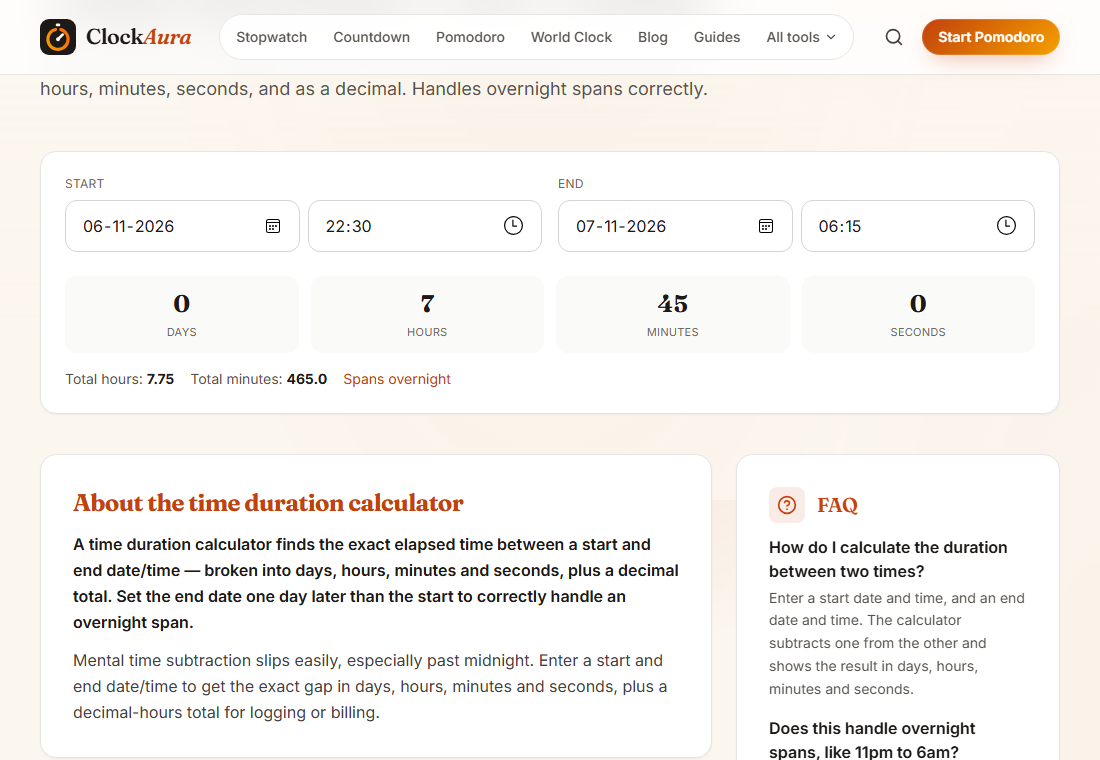
We used this shift for the screenshot. To check your own:
- Open the time duration calculator.
- Enter the start time as 22:30 and the end time as 06:15.
- Read the result: 7 hours 45 minutes. The calculator treats an end time earlier than the start as the next day.
- Take off your unpaid break by hand, then divide the leftover minutes by 60 for the decimal figure.
For a broader guide to day shifts and weekly totals, see how to calculate hours worked, or use the hours calculator to check your sums.
FAQ
Why does my spreadsheet show a negative or strange result for a night shift? Because it is subtracting a later clock time from an earlier one. Add 24 hours (or 1 day) to the finish time when it is smaller than the start time.
Is midnight 00:00 or 24:00? Both are used. 00:00 usually means the start of a day and 24:00 the end of one. For shift maths, 24:00 is handy for the "before midnight" part.
How do I handle a 12-hour shift from 19:00 to 07:00? 07:00 + 24 = 31:00. 31:00 - 19:00 = 12:00. Then take off any unpaid breaks.
Should I round to the nearest quarter hour? Only if your employer's policy says so. Work out the exact time first, then apply any rounding rule.