Interval Timer — Full Screen HIIT & Circuit Timer
Set your work seconds, rest seconds, and total rounds. Get loud audio cues between intervals so you never have to glance at the timer mid-burpee.
About the interval timer
An interval timer alternates between timed work and rest periods for a set number of rounds, beeping at each switch so you never have to watch the clock. Set your work seconds, rest seconds and round count, and it runs the whole session hands-free.
It plays one sound to start work and another for rest, and counts down each round on a display you can read across a gym. Use any seconds you like — Tabata (20 on, 10 off), EMOM, custom HIIT or a physio warm-up — and save setups as presets.
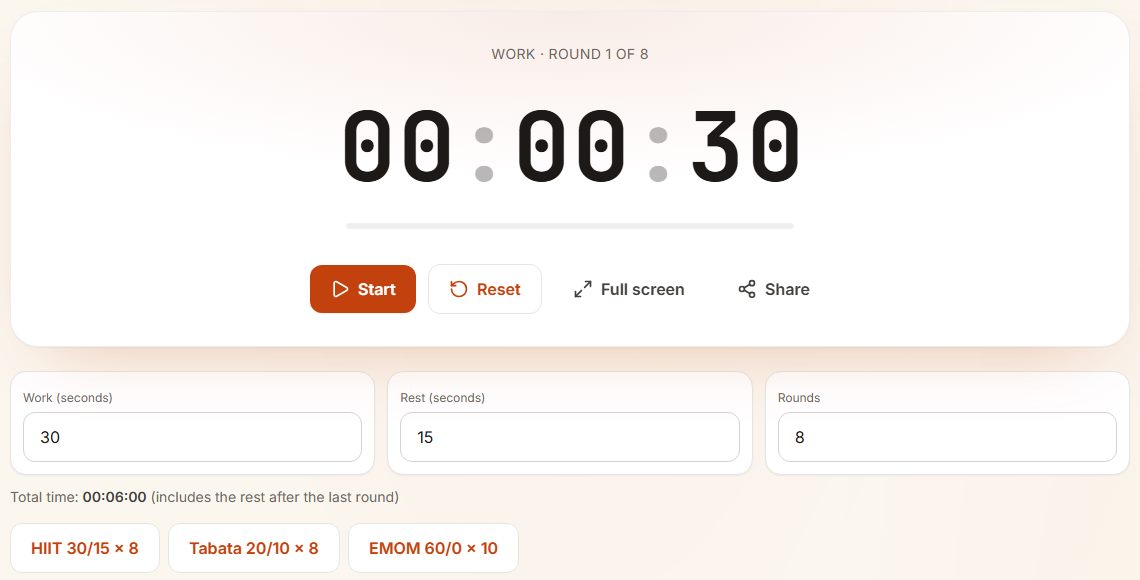
- The label above the clock says which phase you are in and which round, so you can glance at it mid-exercise.
- Total time is worked out for you: 8 rounds of 30 + 15 seconds is 6 minutes, including the rest after the last round.
- The three buttons load common formats: HIIT 30/15 x 8, Tabata 20/10 x 8 and EMOM 60/0 x 10.
- My presets saves your own workout under a name, in this browser.
Common interval formats
| Format | Work | Rest |
|---|---|---|
| Tabata | 20 sec | 10 sec |
| Classic HIIT | 40 sec | 20 sec |
| Beginner | 30 sec | 30 sec |
| Strength circuit | 45 sec | 60-90 sec |
Building a session from three numbers
Every interval workout is work time, rest time and rounds. A beginner circuit might be 30 seconds work, 30 seconds rest, 8 rounds: 8 minutes in total. A harder session might be 40 on, 20 off, 10 rounds. Add a warm-up and cool-down of five minutes each and the whole thing still fits in 20 minutes.
Pick the ratio for your goal. Equal work and rest suits beginners and strength moves. Twice as much work as rest is harder conditioning. Twice as much rest as work suits all-out sprints. Our article on EMOM, Tabata and AMRAP compares the common formats.
Making the timer work hands-free
Prop the phone or laptop where you can see it from the floor, turn the volume up and go full screen. The beeps mark each change, so you never need to touch the screen with sweaty hands mid-set.
When to use the interval timer
- Tabata — eight rounds of 20 seconds work, 10 seconds rest.
- HIIT classes at home — 30 seconds work, 15 seconds rest, 8 rounds.
- EMOM (every minute on the minute) — short bursts of strength every 60 seconds.
- Boxing rounds — 3-minute work, 1-minute rest, 3-12 rounds.
- Yoga and stretching — 60 seconds per pose, 10 seconds to switch.
- Physical-therapy circuits at a fixed cadence.
- Sprint intervals on a treadmill or track — work fast, walk slow, repeat.
How to use the interval timer
- Set the work seconds, rest seconds and number of rounds.
- Optional: tap a preset — HIIT, Tabata or EMOM — to fill the fields instantly.
- Press Start. A chime kicks off each work block; a beep marks the start of every rest period.
- Watch the round counter — it tells you exactly which rep you're on.
- When all rounds finish, the screen shows Done.
Tips for interval training
- Pick a work-to-rest ratio that matches your goal: 1:1 for endurance, 2:1 for power, 1:2 for explosive sprint work.
- Beginners should try four Tabata rounds before eight.
- Use landscape and full screen to read the timer across the room.
- Cast the screen to a TV for group workouts.
- Save the configurations you use most as presets so you never have to re-enter the numbers.
Interval timer FAQ
What is Tabata?
A HIIT protocol from Dr Izumi Tabata: 20 seconds all-out, 10 seconds rest, eight rounds — four minutes. The Tabata preset sets it in one tap.
Can I have rest as zero seconds?
Yes — set rest to 0 for an EMOM-style timer where each round runs straight into the next. The timer skips the rest phase entirely.
What's the difference between rounds and rest?
A round is one work + one rest cycle. The number of rounds is how many of those cycles to complete. Rest is the pause length inside each cycle.
Do you have a beep on the last three seconds?
Right now the cue plays at the start of each phase. A 'last three' countdown beep is on the roadmap — let us know if you'd like to vote it up.
Can I share a preset with a friend?
Saved presets stay in your browser. To share, just tell your friend the work, rest and rounds — entering them takes about ten seconds.
Can I use it as an AMRAP or boxing timer?
Yes. For AMRAP, set one long work period (for example 12 minutes) and do as many rounds as possible. For a boxing timer, use 3 minute rounds with 1 minute of rest. It works as a general workout timer for circuits too.
How many rounds should a beginner do?
Start with 6 to 8 rounds of 30 seconds work and 30 seconds rest. Add two rounds a week while your form stays good. Check with a doctor first if you have a heart condition or have not exercised in a long time.