Pomodoro Timer Online — Full Screen 25/5 Focus Timer
The Pomodoro Technique in one click. 25 minutes of focused work, then a 5-minute break. After four rounds, take a longer 15-30 minute rest. ClockAura auto-cycles so you never have to set the next interval manually.
About the Pomodoro Timer
Work for 25 focused minutes, take a 5-minute break, and after four rounds take a longer 15-30 minute break. This timer switches to the right next mode and length automatically — just press Start again. No sign-up.
Francesco Cirillo devised the Pomodoro Technique in the late 1980s, naming it after the tomato-shaped kitchen timer he used at university: 25-minute focus blocks, five-minute breaks, and a 15-minute break after every fourth block. This timer tracks the cycle — when a session ends it sets up the next mode and length, so you only press Start. Your last 30 days of completed sessions are logged so you can see how the week went.
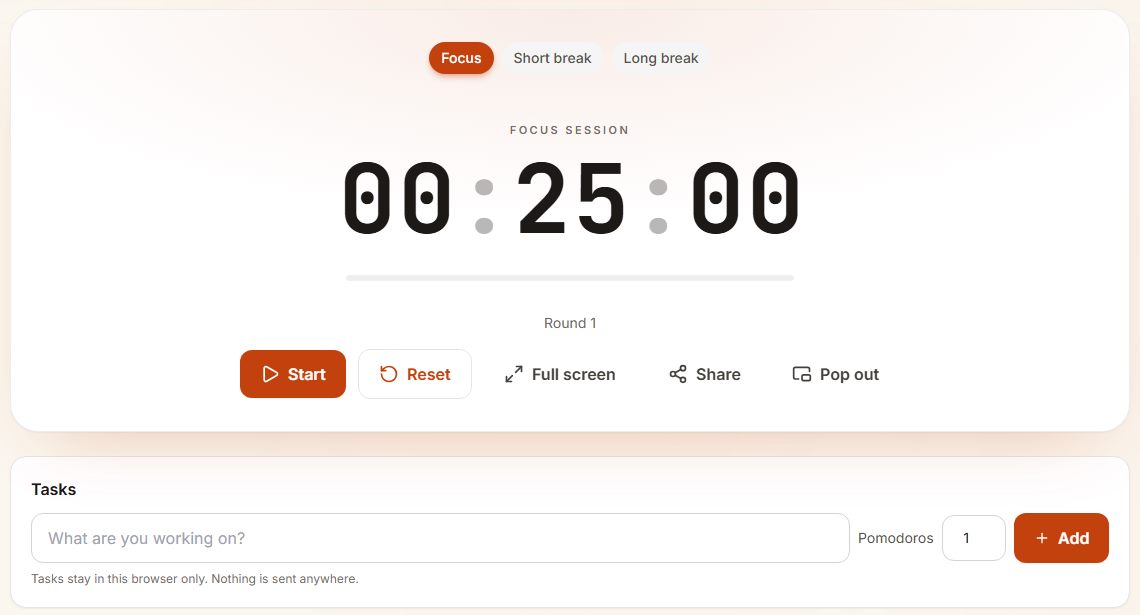
- The three tabs show which part of the cycle you are in. After each focus block the timer moves itself to the right break.
- Round 1 counts up as you finish focus blocks; every fourth break is the long one.
- Tasks: type what you are working on and how many Pomodoros you expect. Each finished focus block is counted against the active task. Tasks stay in this browser only.
Pomodoro variations people actually use
| Variation | Focus | Break |
|---|---|---|
| Classic Pomodoro | 25 min | 5 min |
| Long-form / deep work | 50 min | 10 min |
| Short attention / ADHD | 10-15 min | 3-5 min |
| Ultradian block | 90 min | 15-20 min |
Choosing your own work and break lengths
The classic 25 and 5 is a starting point, not a rule. If you keep getting interrupted at minute 15, try 15 and 3 for a week. If you are deep in writing or code and the bell feels like an interruption, try 45 and 10, or 50 and 10.
A useful test: at the end of each block, ask whether you could have kept going with the same focus. If the answer is yes most of the time, lengthen the block by five minutes. If you were already drifting, shorten it.
What to do in the break
The break works best when it is a real change: stand up, refill water, look out of a window. Scrolling a phone tends to stretch a five-minute break into fifteen and makes the next block harder to start.
Keep a scrap of paper next to you during the work block. When an unrelated thought arrives (an email to send, something to buy) write it down and deal with it in the break.
Planning a day in pomodoros
Count blocks, not hours. A typical focused day holds 8 to 10 blocks of 25 minutes. Estimate each task in blocks before you start, then compare at the end of the day. For students, our 7-day Pomodoro study plan shows a full week laid out this way.
When the Pomodoro Timer helps
- Long study sessions where you drift to your phone after twenty minutes.
- Knowledge work that gets interrupted constantly — coding, writing, research.
- Solo creative work — drawing, music practice, language drills.
- Pair programming or study buddies — both partners work the same cycle.
- Starting a task you've put off — 'just one Pomodoro' is easier to commit to than 'a whole afternoon'.
How to use the Pomodoro Timer
- Tap Focus to confirm a 25-minute work block, then press Start.
- Work without distraction — no email, chat or quick browsing.
- When the bell rings, the timer switches to a five-minute Short break. Stand up and stretch.
- After the fourth focus block it switches to a 15-minute Long break instead.
- Change the focus and break lengths below the timer if 25/5/15 doesn't suit you.
Tips for a better Pomodoro
- Keep a notebook by the keyboard; jot down distractions during a focus block and deal with them on the break.
- Pick one specific outcome for each Pomodoro before you start. "Write the intro paragraph" beats "work on the essay".
- Don't skip breaks — they are what makes the technique sustainable.
- If 25 minutes is too short for deep work, try 50/10 by changing the focus value.
- Check the 30-day stats panel to see when in the day you focus best.
Pomodoro Timer FAQ
Why 25 minutes? Where does the number come from?
Cirillo found 25 minutes long enough for real progress and short enough to stay focused, and 25 + 5 fits neatly into a half-hour calendar slot.
Should I take a break if I am in flow?
Usually yes — the rhythm is what trains focus. If you cannot stop, finish the thought and use the break to note where you were.
How many Pomodoros should I aim for in a day?
6-8 is a strong day for most knowledge workers. Consistency matters more than the occasional huge day.
Can I customize the lengths?
Yes — change the Focus, Short break and Long break minute fields at any time. Your preferences are saved per device.
Does ClockAura log my Pomodoros?
Yes — each completed session is recorded against an anonymous ID, showing your last 30 days of focus minutes and breaks. No account needed.
Can I use this as a study timer?
Yes — it is one of the most popular study timers. Each session is a 25 minute focus block followed by a short break, which is easy to repeat for a whole revision day. Many students run it on a second screen for "study with me" style sessions.
Why is it called a tomato timer?
Pomodoro is Italian for tomato. Francesco Cirillo, who created the technique, used a tomato-shaped kitchen timer, so people still call it the tomato timer. This pomodoro online version works exactly the same way without the ticking.
Should I take the long break after four pomodoros?
That is the traditional pattern, but if you feel tired after three, take it then. The long break exists to stop fatigue building up, so let your energy decide.