Online Countdown Timer — Full Screen, With Alarm
Type in hours, minutes and seconds. Press Start. When the timer ends, an alarm plays and the screen flashes — even if the tab is in the background. Share the URL to send the same timer to anyone.
About the countdown timer
Set hours, minutes and seconds, press Start, and a loud alarm plays when the countdown hits zero. The timer keeps running and the alarm still fires while the tab is in the background — but not if you fully close the tab or browser, so keep the tab open.
Enter any hours, minutes and seconds and the clock counts down to zero, then sounds an alarm loud enough to hear from the next room. No sign-up and nothing to install — useful for pasta, meetings that must not overrun, or ending screen time on schedule.
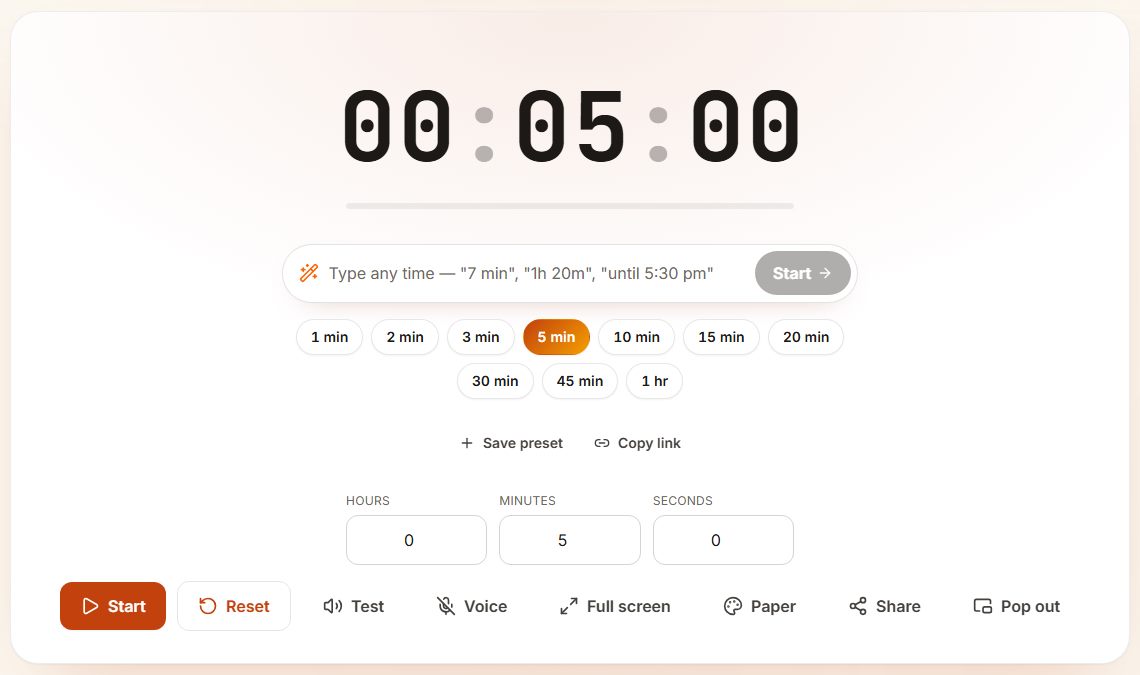
- The type box at the top accepts plain phrases such as "7 min", "1h 20m" or "until 5:30 pm", so you rarely need the number fields.
- The preset row (1 min to 1 hr) starts a common length in one tap; the highlighted button is the current length.
- Save preset keeps your own length in this browser; Copy link gives a URL that opens the same timer on another device.
- Test plays the alarm sound now, so you can set the volume before the real alarm. Voice turns on a spoken countdown.
- Pop out opens a small always-visible window (on browsers that support picture-in-picture), useful during a video call.
Quick setups people use most
| Task | Set it to | Tip |
|---|---|---|
| Pasta (dried) | 8:00–11:00 | Start when the water returns to a boil |
| Kids' screen time | 30:00 | Let the alarm be the "bad guy", not you |
| Meeting hard stop | 25:00 | Full-screen it so everyone sees it |
| Laundry check | 45:00 | Background tab is fine — alarm still rings |
| Exam practice | 1:00:00+ | Supports up to 99 hours |
Picking the right length for the job
Most countdowns fall into three bands. Under five minutes is for things that must not be forgotten: tea, a face mask, a phone call you promised to return. Ten to thirty minutes is for a block of work or a chore. Anything over an hour is usually a reminder, like moving the car before parking ends, rather than something you watch.
If you are not sure how long a task takes, set the timer a little short. When it rings you decide whether to add time with +1 min. That small check-in is often more useful than the alarm itself, because it tells you how long the task really takes next time.
Three set-ups people use every day
Cooking: start one countdown per dish, or open the multiple timers page so the pasta and the sauce each have their own label. A timer without a label is easy to confuse when two go off a minute apart.
Homework or reading: 20 minutes on, 5 off, repeated two or three times. Put the page in full screen on a laptop at the edge of the desk so the remaining time is visible without picking up a phone.
Presentations: set the timer to your slot minus two minutes. When it ends you know to start your summary, and you still finish on time.
What happens if the tab is in the background
The countdown is worked out from the clock, not from counting ticks, so it stays correct when you switch tabs. The alarm still plays as long as the tab is open and the device is not asleep. On a phone, keep the screen on or plug it in for long timers; a locked phone can suspend the browser.
When to use the countdown timer
- Cooking — pasta, rice, simmering sauces, baking, sous-vide and resting meat.
- Meetings — keep stand-ups, lightning talks and round-robin updates strictly on time.
- Studying — focus blocks with short breaks, without a full Pomodoro setup.
- Workouts — quick AMRAPs, plank holds, breath-hold practice and warm-up rounds.
- Parenting — fair turn-taking on a console, screen-time limits and homework blocks.
- Public speaking — rehearse a talk against a hard limit.
- Tea and coffee — French press, green tea steep, espresso shot pulls.
How to set a countdown timer
- Type your hours, minutes and seconds into the three input boxes.
- Click Start (or Spacebar) — the display switches to a large countdown.
- If the browser asks for notification permission, allow it once to get a popup when the timer ends.
- Pause and resume any time without losing the remaining time.
- At zero the screen flashes, the alarm plays and the tab title changes to "Time's up!" so you notice from another tab.
Tips for using the countdown timer
- Choose a sound in the Sound picker — beep, long beep, double beep, bell or chime.
- Set the volume once; it is saved across visits.
- Bookmark a preset duration page (for example clockaura.com/t/5m) for one-click starts.
- On supported devices the screen stays on while a countdown runs — useful in the kitchen.
Countdown timer FAQ
What is the longest countdown I can set?
Up to 99 hours. To count down to a calendar date, use the Countdown to Date tool.
Can I set the timer to repeat automatically?
The countdown timer runs once and stops. For repeating cycles like work-rest patterns, use the Interval Timer or the Pomodoro Timer.
Will the alarm play if my phone is on silent?
Browser audio follows media volume, not the ringer, so on most devices it plays on silent — as long as the tab is open and media volume is up.
Does the timer keep running if I close the tab?
No. Closing the tab ends the timer. To set a true alarm that survives tab changes inside the site, use the Alarm Clock — it rings on every ClockAura page until you stop it.
Can the timer count down out loud?
Yes. Turn on Voice and it announces one minute and thirty seconds remaining, counts ten to one aloud, and says when time is up. It uses your browser’s built-in speech, so nothing is downloaded.
Can I set a timer until a specific time, like 5:30 pm?
Yes. Type it in the box above the timer, for example "until 5:30 pm" or "at 17:45", and the countdown runs to that clock time. The same box understands "7 min", "1h 20m", "90 sec" and "half an hour".
Can I set a 30-second or 90-second countdown?
Yes — enter 30 seconds, or 1 minute 30 seconds. There is no minimum.
Is this the same as a countdown clock?
Yes. A countdown clock and a countdown timer are the same thing here: big digits that tick down to zero and ring. It works as a 30 second timer, a 10 minute timer or a 3 hour timer — anything up to 99 hours.
Can I set a countdown longer than 24 hours?
For anything measured in days, use the countdown to a date page instead. It counts down to a calendar date and time, and you can come back to it later.
Why did my alarm not make a sound?
Browsers block sound until you have tapped the page once. Press Start yourself rather than relying on a shared link, and check that the phone is not on silent.
Guides
Related reading
More timers
In other languages
Popular timer durations
- 5 Minute Timer
- 10 Minute Timer
- 15 Minute Timer
- 20 Minute Timer
- 25 Minute Timer
- 30 Minute Timer
- 45 Minute Timer
- 1 Hour Timer
Counting down to a date instead? See the holiday countdowns or use the countdown to date tool.